
FILTRIX / Lesson 04 of 4
How to Validate a Trade-Ideas Alert
Translate a Trade-Ideas alert into measurable FILTRIX filters, inspect the historical sample, and test a defined execution rule.
Watch the walkthrough
Validate an Alert video walkthrough
Read the full video transcript
A Trade Ideas alert is a starting question. To study it in Filtrix, turn the conditions into an exact filter definition. This lesson shows a simple example, the Collaborate import shortcut, and the checks that keep a historical test tied to the information you actually had.
Consider a hypothetical setup: a gap of at least five percent and a price of at least ten dollars. In Filtrix, the corresponding fields are gap underscore gup and price underscore price. Use greater than or equal to for both. The numbers illustrate the syntax, not recommended trading thresholds. Both conditions must match.
Open Context. Paste the example command from the written lesson into Filter command, then select Apply. Check that two rows appear with the expected columns, operators, and values. Applying the command replaces the current filter rows. You can also build the same definition manually with Add Filter.
If you have a Trade Ideas Collaborate link, paste it into the same field and select Apply. The importer maps supported minimum and maximum conditions. It does not recreate the entire alert window. Exchanges and stock lists are not imported, and unsupported filter codes are reported as skipped. Compare the resulting rows with the original definition before continuing.
Timing matters as much as the filter values. A price or volume condition observed at ten fifteen cannot justify an entry at nine thirty. Record when each condition became known, and use an execution rule consistent with that timing. Saving All avoids choosing days by their final close, but it cannot remove timing bias from the filters themselves.
Choose research and validation periods before inspecting the result. Run Context, check the counts and underlying rows, and save All for a timing-consistent execution test. Keep a note of the filters, missing imported conditions, dates, and rules. Your finished exercise should let someone else reproduce what you tested, including its limitations.
What You Will Learn
- Read a Trade-Ideas alert and pick the measurable signals out of the headline.
- Translate alert text into FILTRIX Context filters that mirror the original conditions.
- Understand what the sample and close-position buckets do and do not show.
- Save the full sample and test explicit execution rules.
Before You Start
- A FILTRIX account. Free accounts can run the full Context Analysis workflow with basic limits.
- A specific Trade-Ideas alert you want to test. Recent or hypothetical both work.
- The conditions known at the intended entry time, plus a separate date period for validation.
Separate measurable conditions from the alert headline
Write down the symbol, alert time, price, gap, float, and volume conditions you actually know. Keep the source and units clear. A headline does not itself define a repeatable setup. Record when each condition became known. A price or volume observation from later in the session cannot justify an entry at the open.
Build or paste the filter definition
For a hypothetical example, translate “gap of at least 5%, price at least $10” into gap_gup >= 5 and price_price >= 10. Paste the command below into Filter command and select Apply, or add the two rows manually. All conditions must match. These thresholds illustrate the syntax; choose conditions from your own research question.
gap_gup >= 5; price_price >= 10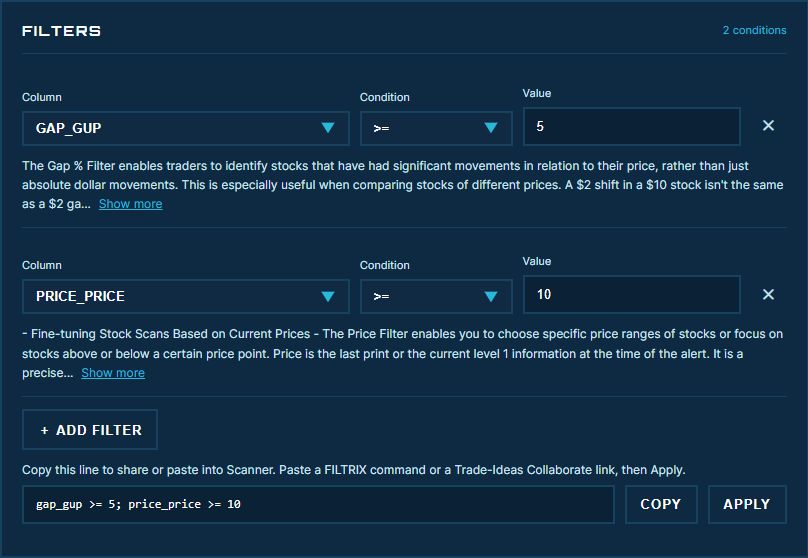
If you have a Collaborate link, review the import
The same Filter command field accepts a Trade-Ideas Collaborate link. The importer maps supported Min/Max conditions into FILTRIX filters. It does not recreate every feature of a Trade-Ideas alert window: exchanges and stock lists are not imported, and unsupported filter codes are reported as skipped. Check the resulting rows against the original definition.
Set a close-position band
Context Analysis classifies where the regular close falls inside the daily high-low range. It does not provide arbitrary VWAP-retracement, time-of-day, or overnight exit settings. Those are different questions; use the supported Execution Analysis rules for intraday entry and exit testing.
Inspect the sample and its concentration
Check Total found in history and Included in calculation (n). Duplicate alerts on one symbol-day do not provide independent daily outcomes. Inspect missing data, repeated symbols, and the date distribution. Neither a fixed minimum count nor a high percentage alone establishes reliability.
Read the buckets as descriptions
Above range, Below range, and In range describe daily close locations. Their percentages are not trade win rates and do not establish profitability. Up / Down / Equal inside each bucket compare close with open and use that bucket as their denominator.
Test execution on the full saved sample
Save the context using All rows. Selecting only a desired closing outcome can introduce look-ahead bias. Execution Analysis supports Green to Red, Red to Green, Open at 09:30, and Bar Break entries, with session-end, holding-period, or stop/target exits. Examine individual trades and remember that reported PnL excludes trading costs. The entry rule must also respect when the filters became observable; saving All does not remove timing bias from the filter definition.
Your turn / about 5 minutes
Write a reproducible research note
Keep a brief note of your inputs and what you observe.
Open FILTRIX in a new tab ↗- Choose one alert. Record the source, timestamp, units, and conditions known before your intended entry.
- Build the filters or import a Collaborate link. Compare every resulting row with the original conditions and record anything missing.
- Choose research and validation periods before looking at results. Record the sample counts, then save All for a timing-consistent execution test.
You're done whenSomeone else could reproduce your filters and test, including the limitations of any imported conditions.
Pause before moving on
Check your understanding
Answer in your own words, then open each question to compare.
Does a successful Collaborate import reproduce the entire alert window?
No. Review the supported Min/Max filters and any skipped codes. Exchanges and stock lists are not imported; alert triggers and other window settings are not a guarantee of equivalent behavior.
Can a 10:15 price condition justify a simulated 09:30 entry?
No. The information was not yet known at the entry time. Align the filter observation time with the intended entry or change the research question.
Get unstuck
If something looks different
The command says Unknown column or cannot be applied.
Use an exact column name from the current Column selector and check the operator and value. Separate conditions with semicolons. The displayed field names can differ from a Trade-Ideas headline.
The import reports skipped filters.
Compare the original link with the imported rows. Add a supported equivalent only if it measures the same condition. Do not assume the reduced filter set reproduces the original setup.
The imported link contains no supported filters.
Build the measurable conditions manually with Add Filter. A link without supported Min/Max conditions cannot define a Context sample automatically.
Common Mistakes to Avoid
- Using a headline as a substitute for measurable conditions.
- Treating an arbitrary sample-size or percentage cutoff as proof of edge.
- Using future information to choose an intraday sample.
- Changing the hypothesis after seeing the result without new validation.
- Assuming Context buckets or cost-free simulations predict live profitability.
Related lessons
How to Use Context Analysis
Build a FILTRIX context, set the close-position band, understand the historical sample and result buckets, then save the full sample for execution testing.
How to Run Execution Analysis
Test entry and exit rules on a saved FILTRIX context. Follow the minute-data pipeline, interpret per-share PnL, and inspect individual trade charts.
Ready to test the setup?
Use the practice task to record your inputs, inspect the sample, and explain the result.
Go to the practice task ↑